Od majątku

Podatki, które opłacasz, kiedy zmienia się Twoja sytuacja majatkowa.

Spadki i darowizny (SD)

Czynności cywilnoprawne (PCC)

Od zakupów

Podatki związane z transakcjami kupna różnych produktów z kraju i zagranicy.

Akcyza

VAT

Pozostałe

Wybrane podatki lokalne oraz inne formy opodatkowania.

Od gier hazardowych

Podatki lokalne

Interpretacje indywidualne

Data publikacji: 15.12.2025
Data aktualizacji: 15.12.2025

e-US

Jedna aplikacja, wiele możliwości

Aplikacja e-US pozwala na wygodne korzystanie z serwisu e-Urząd Skarbowy.

Site also available in other languages for  

About the app

Discover the e-Tax Office mobile app

Check out its features

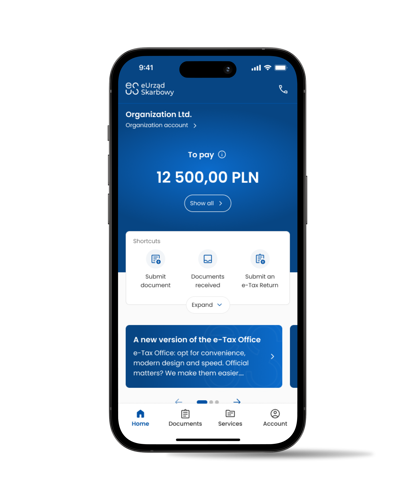
The e-Tax Office is a free app by the Ministry of Finance that enables you to handle official matters online in a secure, fast, and convenient manner, 24/7, without leaving your home. Download, install, and activate the e-US mobile app on your smartphone to take full advantage of its features.

""

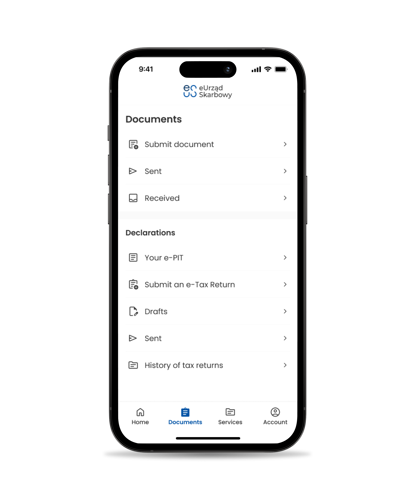
Documents

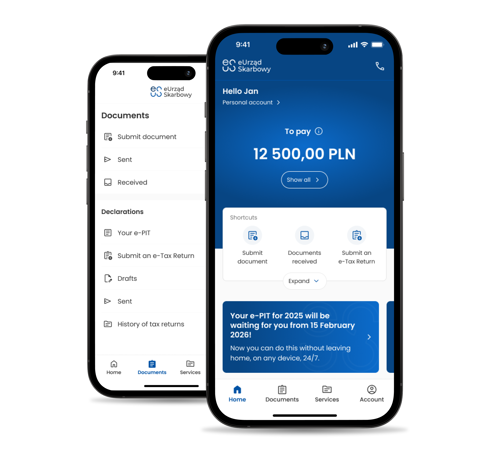
Need a certificate? Want to file a tax return or another document? It couldn’t be easier! Our app simplifies these and many other tasks, anytime you need it. Manage your documents and consent to e-Correspondence to send and receive electronic documents.

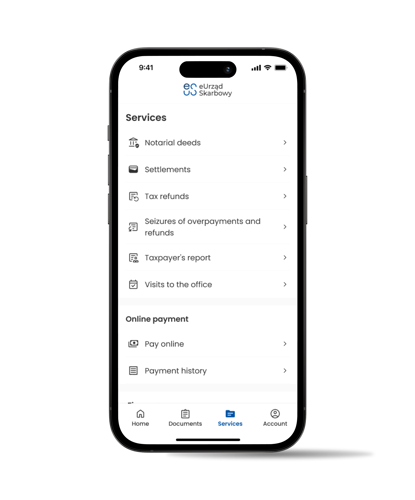
Services

Take advantage of e-Tax Office services

Handle various matters online. For example, you can view lists of your notarial deeds, download a Taxpayer Report, check your tax settlements with the office, or pay a tax or fine.

""

""

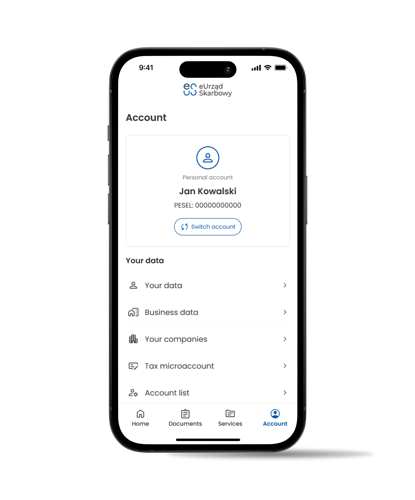
Your data

Check your tax data

Your data in one place. You can verify the accuracy of your personal data and information about your business, if applicable. You will also find information about your micro-account for payments and much more.

Discover more capabilities

Download the e-Tax Office app

Install the e-Tax Office app and handle official matters without leaving your home, 24/7.

Pobierz z Google Play

Pobierz z App Store

""

Your data is always safe

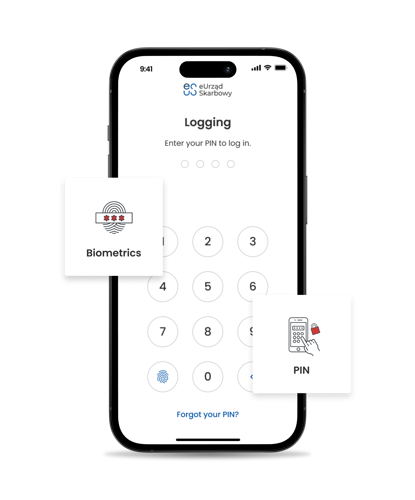
We use biometrics and a PIN
""

Secure login.

You can log into the app using biometrics or a PIN. If you lose your phone, your data remains secure – giving you peace of mind.

""

Additional security.

Access to the account on your mobile device can be removed via the web application.

""

""

Secure data.

Your personal data is not stored on the device.

""

Stay alert!

Download apps only from secure sources. Do not share your PIN.

Key features

e-Tax Office offers numerous features to simplify handling matters in the tax office:

""

Submitting and receiving documents

Submit a document to a selected authority using the available wizard. You can also submit a document on behalf of another person or entity. You will receive a response electronically in the app.

""

Filing tax returns

File PIT, CIT, VAT, PCC, SD and other tax returns, registration forms (identification and update notifications): ZAP-3, NIP-2, NIP-7, NIP-8, as well as forms related to SMEs.

Powers of attorney

Submit a power of attorney for signing tax returns submitted electronically (UPL-1) and review lists of active powers of attorney.

""

Your personal data and data regarding your business and partnerships

Check your personal data as well as data regarding your business and partnerships you are involved in.

""

Taxpayer report

Access comprehensive tax information prepared for individuals conducting business activities.

""

Online payments

Make payments via BLIK or electronic transfer and review the record of payments made through the e-Tax Office.

""

Settlements

Verify balances and details of tax liability settlements with the tax office.

""

Penalty notices

Access information on imposed penalty notices and pay the fine online.

""

Tax micro-account

Check details regarding your tax micro-account for payments.

""

Tax return record

View and download submitted PIT, CIT, PCC, SD, and VAT returns.

""

Tax refunds

Check the status of your PIT and VAT refunds.

""

Notarial deeds

View the list of your notarial deeds.

Qestions and Answers

Find answers to frequently asked questions about the e-Tax Office app.

The e-Tax Office mobile app is available to adults with a PESEL number.

You can log in to the e-Tax Office mobile app through login.gov.pl (i.e., Trusted Profile, mObywatel app, online banking or e-ID).

The app is intended for phones with Android OS version 9.0 or higher (the latest available version is recommended) and iOS version 13 or higher, with access to the App Store.

  1. Download the e-Tax Office app from Google Play or the App Store.
  2. Launch the app and start the activation process.
  3. Accept the terms and conditions and privacy policy, set a PIN, and optionally enable biometric login.
  4. Proceed to log in using one of the available methods.
  5. If the login is successful, you should see a message: “Congratulations! You have activated the app.”

No. Currently, it is not planned to make the app available in other stores. The only legal and secure version of the e-Tax Office mobile app can be downloaded from Google Play or the App Store.

Yes. You should update the app to fully use all its features.

After logging in through login.gov.pl (Trusted Profile, e-ID or online banking) or the mObywatel app, you will have full access to your data and all e-Tax Office services available in the account of an individual.

Not at the moment, but the app is constantly being developed, and organization account users will also be able to use it in the future.

If you forgot your PIN, you can set a new one.

  1. On the app’s login screen, select “Forgot your PIN?” and then “Log in again”.
  2. You will have to log in again using a selected login method and then set a new PIN. The PIN will be changed.
  3. You can now log in to the app using your new PIN.

Yes.

  1. Select the “Account” tab on the main screen.
  2. In the options list, choose “App Settings,” then “Security,” and finally “Change PIN”.
  3. Set a new PIN.

Yes. Biometrics is one of the login options.

Yes.

  1. Select the “Account” tab on the main screen.
  2. In the options list, choose “App Settings,” then “Security,” and finally “Biometric Login”.
  3. Enable biometric login.
  4. Follow the instructions on the screen.

Tak. Wejdź w ustawienia aplikacji i wybierz jeden z trzech dostępnych języków. Jeśli język systemowy urządzenia jest językiem innym niż jeden z trzech dostępnych w aplikacji tj. polski, angielski i ukraiński to użytkownik otrzymuje ekran w języku angielskim umożliwiający wybór języka.

  1. Log in to the app.
  2. Select the “Account” tab on the main screen.
  3. Select “Rate the App” from the options list.
  4. You will be redirected to the online store to leave your feedback about the app.

Materials

We have prepared a set of official materials related to the e-Tax Office app. Feel free to use them.
Service

e-Correspondence

Give consent for electronic delivery to your e-Tax Office account – send and receive correspondence electronically.

By enabling electronic delivery to the e-Tax Office account, users who have given consent to e-Correspondence receive necessary documents, including certificates, without leaving their homes.

Electronic delivery to the user’s e-Tax Office account allows two-way communication between the National Revenue Administration (KAS) and its clients, enabling many administrative matters to be handled online.

Contact

If you have any questions or problems with the app, write to:

E-MAIL: